FAQ
1. Post Only (Maker Only)
Orders are only added to the order book as maker orders, providing liquidity without immediate execution.
If the order cannot be placed as a maker order, it is automatically canceled.
Use case: Suitable for users who want to earn maker fee rebates or avoid taker fees.
2. IOC (Immediate Or Cancel)
Orders execute immediately for the available portion, and any unfilled portion is automatically canceled.
Use case: Suitable for users who accept partial execution and need fast order fulfillment.
3. FOK (Fill Or Kill)
Orders must be fully executed immediately; otherwise, they are entirely canceled.
Use case: Suitable for users who require full execution and do not accept partial fills.
Step-by-step guide
1. Access the Trading Interface (Web Version)
Log in to your CoinW account.
Select a trading pair (e.g., BTC/USDT).
Choose "Advanced Limit Order.”
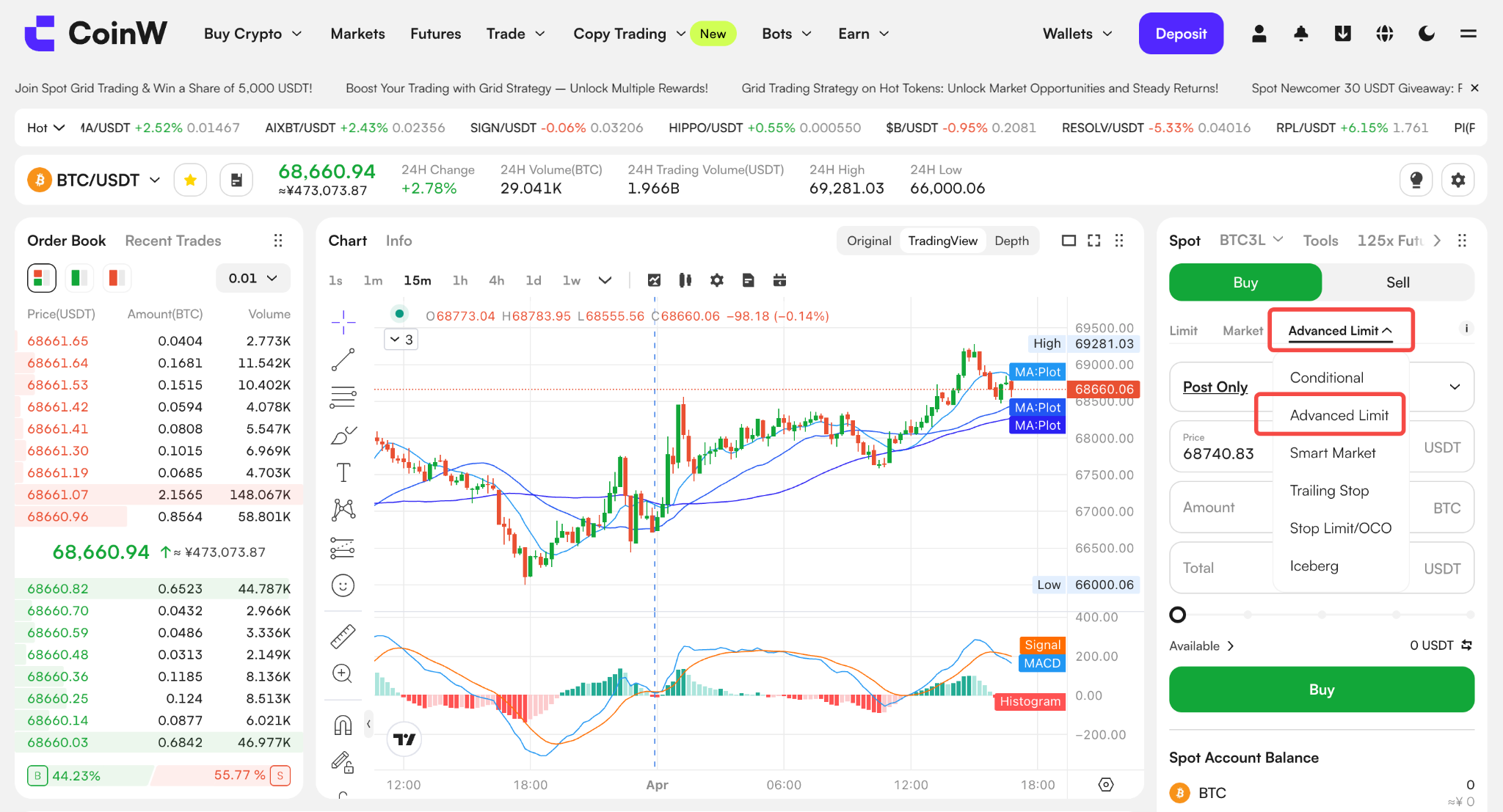
2. Select any of the following order modes:
Post Only (Maker Only)
IOC (Immediate Or Cancel)
FOK (Fill Or Kill)
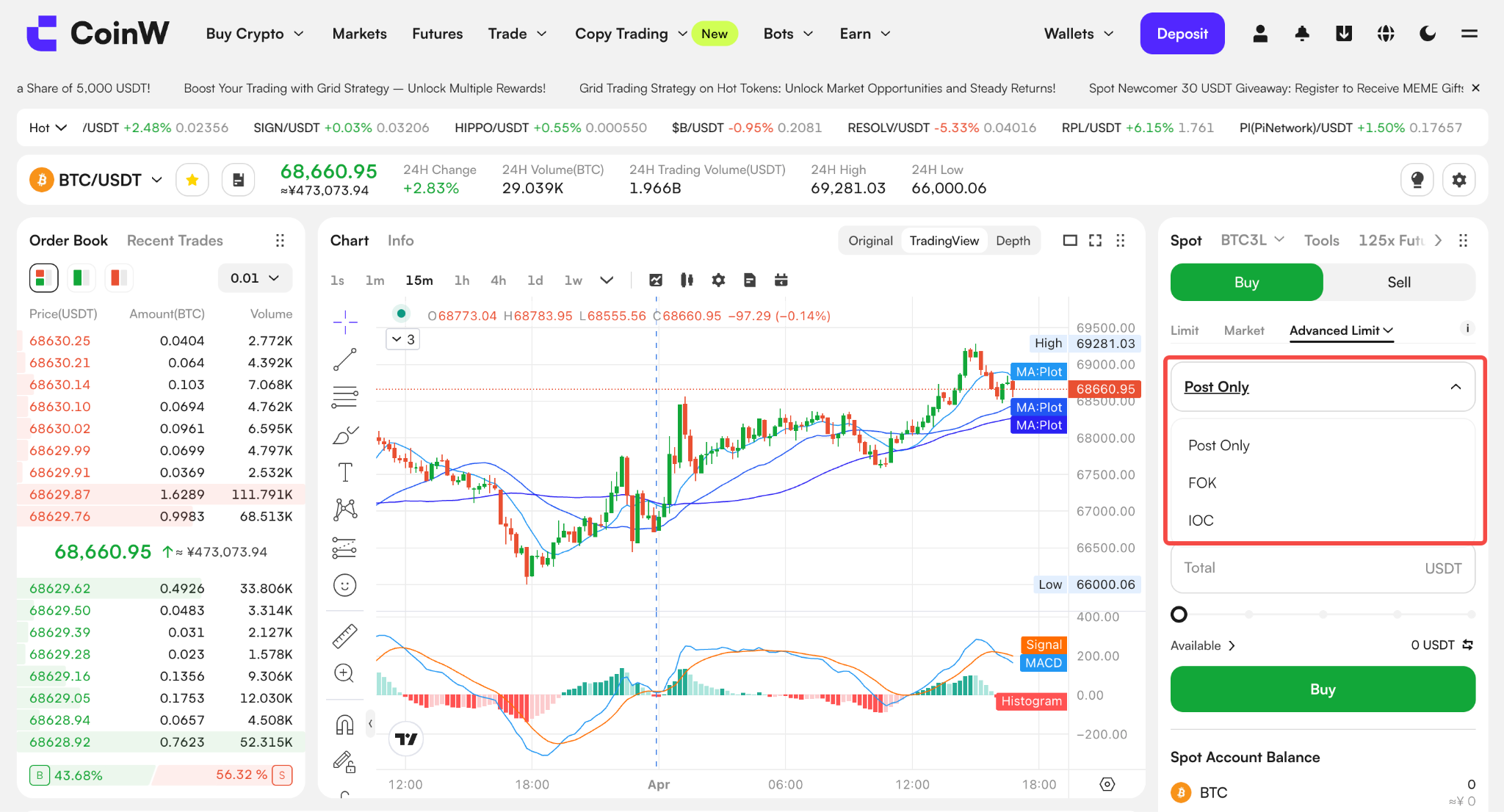
3. Enter Price and Quantity
Click "Buy/Long" or "Sell/Short" to confirm the order.
4. Review and Confirm
Double-check the price and quantity, then confirm and submit the final order.
Key Considerations
1. Post Only (Maker Only)
If the order is executed as a taker instead of a maker, it will be automatically canceled and will not be added to the order book.
You can check the status of the canceled order in [Order History].
Successfully placed maker orders qualify for maker fee discounts.
2. IOC Mode
The order may be partially filled, and any unfilled portion will be automatically canceled.
Ideal for high-volatility markets where quick execution is needed to avoid slippage.
3. FOK Mode
If the market lacks sufficient liquidity, the order will be entirely canceled, with no partial fills.
Suitable for large trades that require full execution.
Frequently Asked Questions
Why was my Post Only order automatically canceled?
This happens when the order price triggered an immediate execution as a taker order. To protect the user, the system automatically cancels it.
If an FOK order isn’t filled, will it stay on the order book?
No, if an FOK order cannot be fully executed immediately, it will be completely canceled.
1. Post Only (Maker Only)
Orders are only added to the order book as maker orders, providing liquidity without immediate execution.
If the order cannot be placed as a maker order, it is automatically canceled.
Use case: Suitable for users who want to earn maker fee rebates or avoid taker fees.
2. IOC (Immediate Or Cancel)
Orders execute immediately for the available portion, and any unfilled portion is automatically canceled.
Use case: Suitable for users who accept partial execution and need fast order fulfillment.
3. FOK (Fill Or Kill)
Orders must be fully executed immediately; otherwise, they are entirely canceled.
Use case: Suitable for users who require full execution and do not accept partial fills.
Step-by-step guide
1. Access the Trading Interface (Web Version)
Log in to your CoinW account.
Select a trading pair (e.g., BTC/USDT).
Choose "Advanced Limit Order.”
2. Select any of the following order modes:
Post Only (Maker Only)
IOC (Immediate Or Cancel)
FOK (Fill Or Kill)
3. Enter Price and Quantity
Click "Buy/Long" or "Sell/Short" to confirm the order.
4. Review and Confirm
Double-check the price and quantity, then confirm and submit the final order.
Key Considerations
1. Post Only (Maker Only)
If the order is executed as a taker instead of a maker, it will be automatically canceled and will not be added to the order book.
You can check the status of the canceled order in [Order History].
Successfully placed maker orders qualify for maker fee discounts.
2. IOC Mode
The order may be partially filled, and any unfilled portion will be automatically canceled.
Ideal for high-volatility markets where quick execution is needed to avoid slippage.
3. FOK Mode
If the market lacks sufficient liquidity, the order will be entirely canceled, with no partial fills.
Suitable for large trades that require full execution.
Frequently Asked Questions
Why was my Post Only order automatically canceled?
This happens when the order price triggered an immediate execution as a taker order. To protect the user, the system automatically cancels it.
If an FOK order isn’t filled, will it stay on the order book?
No, if an FOK order cannot be fully executed immediately, it will be completely canceled.